How Do You Plan Your First Business Website?
Plan your first business website around the customer’s next action, then decide the pages, content and systems needed to support it.
Kamil Kuś · 2025-04-30T19:04:34 · 6 minute read
Plan your first business website around the customer’s next action, then decide the pages, content and systems needed to support it. A useful brief explains who the site is for, what visitors need to know, what they should do and who will maintain the information. Start there before choosing layouts, features or a platform.
Where should a business owner start?
Imagine a Dublin service business that currently receives most enquiries by phone. Its owner wants a website, but the initial brief says only “something modern”. This is a fictional planning example, not a CK case study.
During a useful planning conversation, the owner identifies three recurring questions: what work the business handles, which areas it serves and what information a customer should send for a quote.
Those questions provide a clearer starting point than a preferred animation or colour scheme. They suggest service information, area coverage and a properly labelled enquiry form.
The point is not to design a site around every request. It is to understand the jobs visitors need it to perform.
What should go in a one-page website brief?
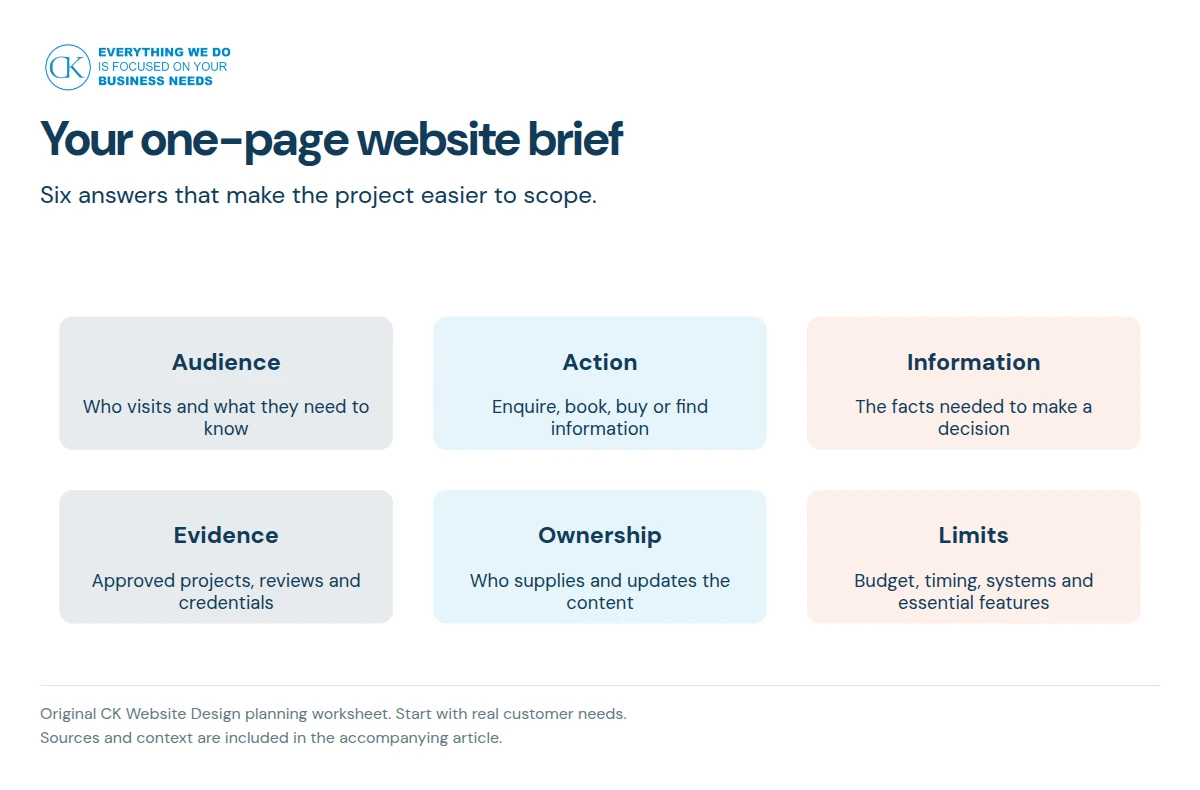
Use this original worksheet. Short, specific answers are more useful than marketing slogans.
| Part of the brief | What to write |
|---|---|
| Audience | Who is likely to use the site, and what do they need? |
| Main action | Enquire, book, buy, apply or access existing information |
| Decision information | Services, availability, location, process, costs or eligibility |
| Evidence | Approved project examples, genuine reviews and relevant credentials |
| Content owner | Who supplies, approves and updates the information? |
| Practical limits | Budget, timing, existing systems and must-have functionality |
Add the current website address if this is a replacement project. Note any pages, booking links or customer systems that must continue working.
A useful audience description
“Everyone in Ireland” is difficult to design for. “A facilities manager comparing maintenance providers and checking service coverage” is more useful.
You can serve several audiences, but identify which decisions each group needs to make. Do not create separate pages simply to repeat the same text with a different label.
A useful primary action
Choose the main action for each important page. A service page might lead to an enquiry. A product page might lead to a purchase. A support page might help a customer find an answer without submitting a ticket.
Those outcomes require different information and controls.
How do you decide which pages to include?
Write the questions customers ask before they contact you. Group questions that belong together, then decide the pages.
For a service business, a sensible first discussion could cover a homepage, service overview, individual service information, evidence, an About page and a contact route. This is an example, not a compulsory page package.
An online shop needs a different conversation about product information, delivery, returns, payment and account behaviour. A portal adds permissions and private information. Do not choose a brochure-site scope for a project that is really an operational system.
Google’s SEO Starter Guide recommends a logical site organisation and useful, well-organised content. It does not require every business to create the same number of pages. [1]
Which content should you prepare before design starts?
Create a content inventory:
- Accurate service names and descriptions.
- Contact details, service areas and operating hours.
- The steps a customer follows after making an enquiry.
- Approved photographs and the right to use them.
- Genuine reviews or case studies with publication permission.
- Any information the form must collect.
- Existing pages and documents that need to remain available.
If something is missing, say so. The quote can then identify whether writing, photography or migration is required.
Never fill an evidence section with invented customers, qualifications or performance figures. Google’s people-first guidance explicitly asks whether content demonstrates trust and adds original value. [2]
What should you check before choosing a platform?
Start with the operations the website must support.
Ask who edits content, whether products or bookings are involved, what outside systems connect to the site and what happens if you change supplier.
A familiar platform can still be a poor fit for an unusual workflow. A custom system can also be unnecessary for a simple publishing need. The builder, template and custom design comparison helps separate those choices.
Who needs to be involved in the project?
Name the decision-maker, content approver, technical contact and person who will use the website after launch. One person can fill several roles, but the responsibilities should be explicit.
| Decision | Who should answer it? |
|---|---|
| Service claims and pricing | The person accountable for the business offer |
| Customer information requested | The staff who handle enquiries and the privacy decision-maker |
| Design approval | The agreed final approver |
| Software access | The authorised account owner or technical contact |
| Launch approval | The owner of the agreed acceptance checklist |
At CK Website Design, Kamil leads each project and works with specialists where the agreed work requires them. Do not plan the schedule around an assumed in-house department. [3]
How do you plan privacy and accessibility sensibly?
Ask what information the site collects and why. Keep form fields proportionate to the purpose, explain how information will be handled and identify any external services.
The Irish Data Protection Commission says consent is normally required for cookies and similar technologies, with an exception for those strictly necessary to provide an explicitly requested service. Do not assume installing analytics automatically resolves consent obligations. [4]
For accessibility, consider navigation, keyboard use, readable content and usable form labels from the start. WCAG offers defined criteria to guide the work. Whether particular legal requirements apply to your business needs its own assessment; a checklist is not a compliance certificate. [5]
What should be ready before launch?
Agree checks for the main customer journey, form delivery, content accuracy, links, mobile layout and authorised account access.
For an existing site, confirm how current URLs are retained or mapped where a change is necessary. Google’s migration guidance makes URL mapping part of the planning for a move involving address changes. [6]
Then plan who will update content, review enquiries and renew subscriptions after launch. The site needs an owner, not just a launch date.
Read what a website quote should include before converting your brief into a proposal.
Sources
- Google Search Central: SEO Starter Guide.
- Google Search Central: creating helpful, reliable, people-first content.
- CK Website Design: website design services. Delivery model confirmed by CK; reviewed on 9 October 2026.
- Irish Data Protection Commission: cookies and tracking technologies.
- W3C: WCAG 2.2 quick reference.
- Google Search Central: site moves with URL changes.
Next step: Discuss your website brief, with your audience, main customer action and content status.
Frequently asked questions
Do I need to know which platform I want?
No. Describe the customer tasks, editing needs and systems involved. A suitable platform can then be discussed against that scope rather than chosen before the requirements are clear.
Should I write all the content before requesting a quote?
You need an honest picture of what exists and what is missing. Finished copy can help, but the supplier should know if research, writing, editing or photography must be priced.
How many pages does a first business website need?
There is no useful universal number. Decide the information and actions customers need, then group them into a clear structure. Do not add pages only to make the package look larger.
Can I use reviews and photographs from other websites?
Check the rights, accuracy and permission before using them. Do not assume a publicly visible photograph or testimonial is available for your own marketing.
What if I do not have time to update the site?
Agree which updates you will handle and which require paid help. A content management system does not remove the need for someone to keep services, contact details and other information accurate.
Is launch the end of the project?
Launch completes an agreed build phase. Hosting, renewals, content updates and maintenance continue afterwards. Establish those responsibilities and costs before approving the project.